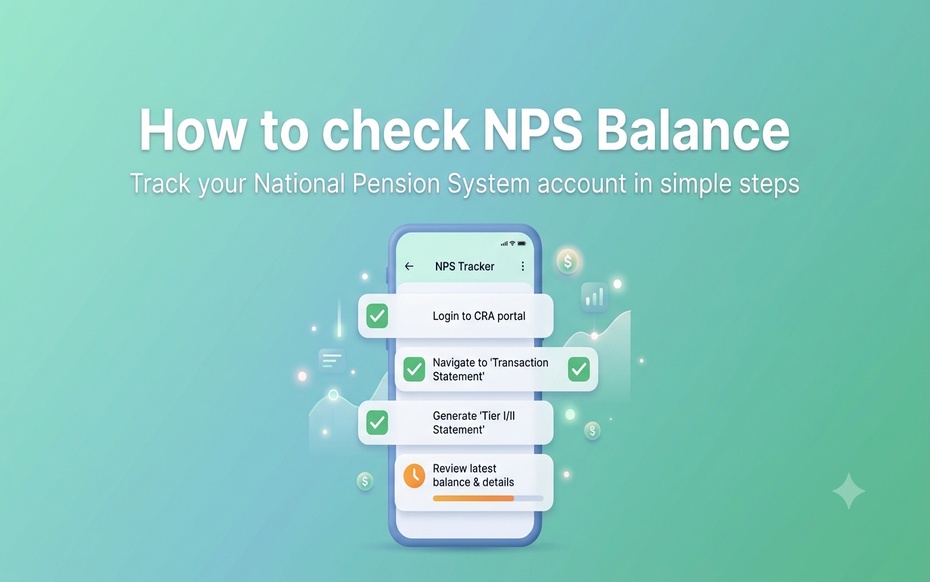


An NPS balance check enables subscribers to use their PRAN to view their account through the CRA portal, mobile apps, and other communicating mediums. Checking NPS balance online is the fastest way to get a snapshot of the total corpus, while statements and SMS alerts are a good source of additional information.
How to Check NPS Balance: Information Required
Before raising an NPS balance enquiry, have the following information available:
Personal Details:
• Permanent Retirement Account Number (PRAN)
• Mobile number registered with the NPS account
• Email ID registered with the NPS account
Login Credentials:
• Password or IPIN for accessing the CRA website/app
Access to:
• The CRA website, app, or UMANG (unified portal for government services)
How to Check NPS Balance Online
Checking NPS account balance online is usually the fastest way for a subscriber to get a snapshot of their total corpus. Subscribers can choose the CRA portal or mobile apps, depending on their preference, to perform an NPS balance check.
How to Check NPS Balance Using the CRA Portal
Steps to Take:
-
Log on to the relevant NPS CRA website, including Protean formerly NSDL, KFintech, and CAMS NPS, depending on the CRA of subscription.
-
Click on the subscriber login tab on the homepage
-
Enter your PRAN as the user ID, the password and captcha pin
-
Click on login to access the dashboard.
-
Visit the holding statement or account/transaction details tab
-
View the subscriber’s own corpus, scheme-wise allocation, and contribution on the NPS balance sheet.
How to Check NPS Balance using the Mobile App
The procedure for checking NPS account balance via mobile apps is like that of the portal. In this case, subscribers must launch the mobile app, log in with their PRAN and password, and select the holdings or account details tab to view their balance.
Most CRAs have their mobile apps, and the UMANG app allows users to access their NPS accounts after setting up a PRAN link.
How to Check NPS Balance Offline: Statements and SMS Alerts
NPS Transaction Statement
The NPS transaction statement contains every subscriber’s contributions, including the number of units with their respective schemes. It provides a more precise breakdown of the account than a general NPS balance check.
Email Statement and Alerts
The CRA sends an email to the subscriber’s registered address on a periodic basis with a summary of all the contributions and statements. Additionally, subscribers can send an email to the CRA to request an account statement.
How to Check Total Contribution in NPS
How are NPS Balance and NPS Contribution Different?
NPS balance and contribution are two distinct terms that denote different information. Total contributions represent the amount of money a subscriber adds to the account themselves or through an employer’s salary deductions.
On the other hand, an NPS balance refers to the value of the subscriber’s account. If the market conditions allow, the balance can be higher than the contribution. Subscribers can view their total contribution in the transaction statement alongside an NPS balance check.
What Information does an NPS Account Holder See on the Dashboard when Logging into the CRA Website or Mobile App?
An NPS account holder will be able to view the following on their dashboard:
• NPS corpus or account balance
• Contribution history
• Scheme and pension fund allocation
• Holding units
• Transaction history
• Download account statement, among other options.
What are the Likely Solutions if a Subscriber is Unable to Check NPS Account Balance?
There are several reasons why a subscriber might not be able to check their NPS account balance at a given time, including:
• Forgotten password: Use the forgot password option on the CRA website to reset it.
• Wrong PRAN: Ensure that the subscriber uses the correct PRAN to check the NPS balance. A wrong PRAN can cause the system to deny access to the subscriber.
• Mobile number not registered with the system: A subscriber should update their mobile number on the PoP or via the CRA portal if their number is not registered with the system.
• Login issues: The subscriber should try clearing the cache or using a different browser or mobile application.
• Contributions made recently: A subscriber should recall that it may take some time for the contributions to reflect in the system.
• Updating of subscriber information: It may take some time before the changes take effect in the system.
Frequently Asked Questions on How to Check NPS Balance
1. Can I check my NPS balance using my PRAN?
Yes, as a subscriber, you can use your PRAN to check your NPS account balance on the CRA website and mobile applications. Additionally, a PRAN will be required to access every other feature on the NPS portal.
2. How can I check my total contribution in NPS?
Log in to the CRA website or mobile app, and select the transaction statement option to view your total contribution.
3. Can I check my NPS account balance without logging in?
A registered mobile number can be used to perform a missed call or send an SMS to get the balance. However, the subscriber will not be able to get more information on their account without logging in to the system using their PRAN and password.
4. How can I download my NPS account statement?
After logging into the CRA website, the subscriber can navigate to the transaction or holding statement tab and use the download option to save the statement as a PDF file on their device.
5. Why can I not see my latest NPS contribution in my account balance?
It is normal for a subscriber to be unable to see their latest contribution to the NPS account. It can take a few working days for the contribution to reflect in the system before it is added to the subscriber’s account balance. This happens because of the time it takes for the units to be allocated once the contribution has been received.
6. Is NPS balance the same as the amount I have contributed to my NPS account?
No, an NPS account balance is not the same as the amount contributed to the account. NPS account balance represents the amount of money in the subscriber’s account. This figure tends to be higher than the contributions for most investors. It is, therefore, important to perform an NPS balance check on a regular basis because the value changes depending on market conditions.
Disclaimer
Past performance may or may not be sustained in future and should not be used as a basis for comparison with other investments. Returns under NPS are subject to market risk and are prone to fluctuation depending on the state of the Financial market.
Investors are advised to consult their own legal, tax and financial advisors to determine possible tax, legal and other financial implication or consequence of subscribing to the schemes of DSP Pension Fund Managers Private Limited. Tax laws are subject to change.